
Udemy
Price
No active coupon right now
View Course →No coupon right now. We'll tell you when there is one.
Mark your own learning status. Opening a course link does not establish enrollment.
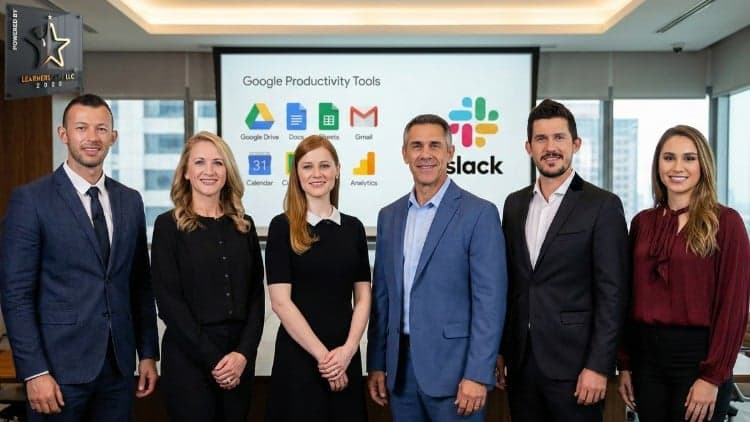
This practical course is designed for professionals, remote workers, students, and team members looking to consolidate their daily tools into a cohesive, efficient system. It bridges the gap between team communication and document management by uniting Slack, Google Workspace, and Gmail under one productivity framework.
Ideal for those juggling multiple responsibilities, this course offers actionable workflows to transition from chaotic multitasking to a structured, flexible digital environment.
This course contains the use of artificial intelligence.
Want to improve your productivity, streamline communication, and manage your daily work more efficiently? This practical course, Boost Productivity with Slack, Google Tools & Email Hacks, will help you explore the features of Slack, Google Workspace, Gmail, and other essential productivity tools to organize tasks, collaborate with teams, and simplify everyday workflows.
Whether you work remotely, manage projects, collaborate with colleagues, or handle multiple responsibilities, learning how to use the right productivity tools can help you work smarter and communicate more effectively.
This course combines two essential areas of workplace productivity: Slack project management and team communication, followed by Google Workspace productivity techniques and email management hacks. You will explore practical features and workflows designed to help you organize information, collaborate on documents, manage schedules, share resources, and improve your digital work environment.
What You Will Learn
1. Master Slack for Project Management and Team Communication
Discover how to use Slack as a collaborative workspace for project management, team communication, and workflow coordination. Learn how to create an account, configure your profile, manage multiple workspaces, and customize your Slack environment.
You will explore workspace settings, preferences, member management, user groups, channels, direct messages, and message posting. You will also learn about Slack's built-in recording features, analytics, search functionality, and Zapier integrations.
These practical Slack productivity techniques can help you organize conversations, improve information sharing, reduce communication friction, and manage collaborative work more efficiently.
2. Improve Productivity with Google Workspace Tools
Explore Google Workspace tools that support document creation, collaboration, scheduling, file management, and team productivity. Learn how Google Docs, Google Sheets, Google Slides, Google Drive, Google Forms, Google Calendar, and Google Keep can support different aspects of your daily work.
You will discover how to use voice typing in Google Docs, access YouTube transcripts, collaborate on documents in real time, work with Microsoft Word files, edit PDF documents collaboratively, and use communication features alongside your documents.
The course also introduces practical approaches to organizing files, managing tasks, coordinating schedules, collecting information, and collaborating through Google's productivity ecosystem.
3. Discover Gmail Productivity and Email Management Hacks
Learn how to make your email workflow more efficient by exploring practical Gmail productivity techniques. The course covers external productivity tools and voice-related approaches, along with internal Gmail management techniques designed to help you organize communication and handle email-related tasks more effectively.
These lessons focus on improving everyday email workflows so you can manage professional communication with greater clarity and efficiency.
4. Organize Your Schedule, Tasks, and Digital Workspace
Learn how Google Calendar can help you manage appointments, coordinate schedules, and work with multiple calendars. Explore Google Keep for organizing tasks and projects, Google Drive for managing files, and Google Forms for collecting information.
You will also explore Google Hangouts, Google Voice, YouTube Live collaboration, offline document access, and paid G Suite applications covered in the curriculum.
By understanding how these tools support different workplace activities, you can develop a more organized and flexible digital productivity workflow.
Why Take This Course?
Modern work often involves multiple communication channels, documents, calendars, and collaboration platforms. Without an organized workflow, it can become difficult to keep track of information and coordinate tasks.
This course brings Slack and Google productivity tools together in one learning experience. Instead of focusing on a single application, you will explore a range of practical features that can support communication, collaboration, document management, scheduling, and email productivity.
You will gain a clearer understanding of how these tools work and how to apply their features to everyday professional tasks.
Who Is This Course For?
This course is designed for professionals, students, project coordinators, remote workers, team members, business owners, and anyone who wants to improve their productivity using Slack, Google Workspace, Gmail, and related digital tools.
Whether you are learning these tools for the first time or want to explore additional features, the lessons will help you build a more organized approach to digital work.
Start Improving Your Digital Productivity
If you want to manage team communication more effectively, explore useful Google Workspace features, organize your email workflow, and make better use of everyday productivity applications, this course is a practical place to start.
Enroll on Udemy and begin exploring Slack, Google tools, email productivity techniques, and collaborative workflows that can help you work smarter.
Advertisement
GMail Productivity Complete Gmail course to Get things Done


Slack & AI Project Management for Niche Website & Ecommerce


ChatGPT for Office Productivity: Use AI for 10X Productivity

Not the best price we've seen. The lowest we've recorded is $12.99 on 28 Oct.
This is what we recorded in US pricing — not every price this course has ever had, and prices differ by country.