Coursera
SubscriptionCinematic Lighting in Maya: Advanced Scenes & Projects
CourseNo ratings yet59INTERMEDIATE
Coursera Plus
View course →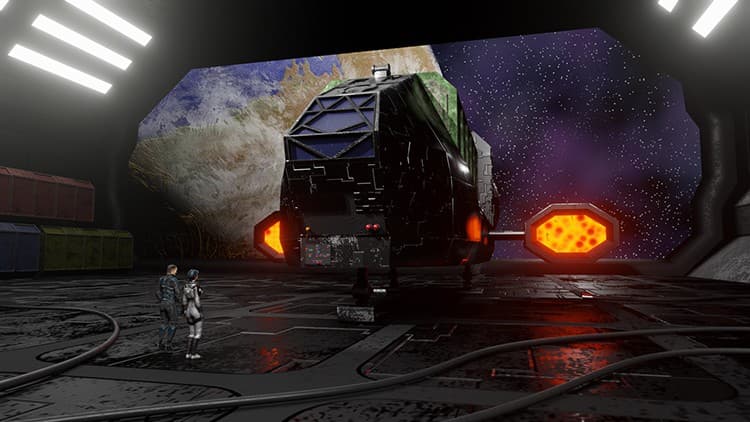 Udemy
Price
No active coupon right now
View Course →No coupon right now. We'll tell you when there is one.
Mark your own learning status. Opening a course link does not establish enrollment.
Loading saved status…
The course builds an animated scene from the first polygon to the final render, using Blender 2.9. You will model a spaceship, a cargo container and a landing bay from reference images, then texture them in the node editor.
Working from reference images teaches you how to match real proportions before any animation starts. The later stages show how a scene is assembled, so each piece has a clear place in the final shot.
Star fields, planet and cloud layers come next, followed by a landing gear rig so the ship's legs and bounce can be animated. Graph Editor work shows the ship coming in to land, and a texture animation drives the plasma engines and jet exhaust.
Characters are brought into the scene, then the picture is rendered and the audio mixed in the Video Sequence Editor. The course suits anyone who wants a finished animated clip rather than a list of separate tools.
Because it targets Blender 2.9, check the interface against your installed version.
In this course we will create an animated scene solely in Blender, from the first polygon to the final render. We will begin by bringing in and setting-up reference images that will help us create the 3D models of the ship, the cargo container, and the landing bay. We will then use Blender’s Node Editor to create the materials and textures for the 3D objects. Once that is complete we will begin work on creating the star fields, as well as the planet and cloud layers.
To prepare the ship for animation, you will learn how to create the rig for the landing gear, so that we can animate the legs and control the ship's bounce when it lands. You will also learn how to use Blender’s Graph Editor as we animate the ship coming in for a landing. And we will have some fun animating a texture to create the plasma-drive engines, and create a jet exhaust animation for the rear of the ship.
You’ll learn how to import characters into the scene and how to render a final animation. We will then bring in music and sound effects and mix the audio to picture in Blender’s Video Sequence Editor. Lastly, we will render out a video clip with both picture and sound.
If you’ve ever wanted to create your own animated scenes in Blender, then this course is for you. Using only free, open-source software you can create anything you can imagine.
So join me for this complete course where you'll Learn Animation Production with Blender 2.9.
Advertisement
Tracking since 15 Nov — not enough history yet to tell you whether today's price is any good. Watch the course and we'll tell you when it drops.
This is what we recorded in US pricing — not every price this course has ever had, and prices differ by country.
No Korshub reviews yet.
Cinematic Lighting in Maya: Advanced Scenes & Projects
Cinematic Lighting in Maya: Interior & Character Lighting
Cinematic Lighting in Maya: Fundamentals & Scene Setup