Udemy
Free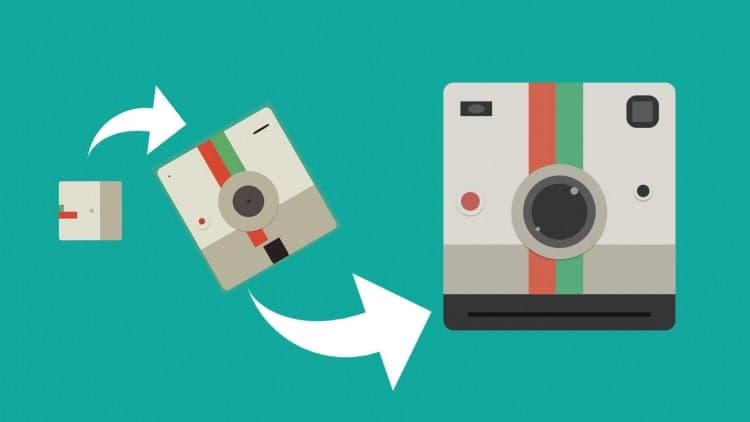 Udemy
Price
No active coupon right now
View Course →No coupon right now. We'll tell you when there is one.
Mark your own learning status. Opening a course link does not establish enrollment.
Loading saved status…
This intermediate After Effects course builds a flat animation buildup, the kind of motion graphic often seen in commercials and broadcast work. In a 45-minute lesson, the polaroid camera graphic is animated as it assembles, with attention to the small details that make an object feel built rather than dropped in.
It works best for designers and video creators who already know the After Effects interface and keyframing basics. The instructor presents it as the third part of a series and recommends the earlier basics courses first, so start there if the software is new to you.
You want to learn how to make fun, hip, and stylish motion graphics in After Effects, right?
This is the third part in my 3-part Dive Into After Effects series. Check out parts 1 & 2 if you haven't already done so. I created this series to make learning how to use After Effects as easy as possible.
You learn by doing.
In the Dive Into After Effects series, you'll follow along and work on your own project while learning. In this course, we'll create our own flat animation buildup - a popular style of animations you see in commercials, television shows, and movies today.
What makes me qualified to teach you?
My name is Phil. I am a professional motion graphics artist and video creator. Plus, I'm the creator of some of the world's most popular After Effects courses - with over 150,000 students and thousands of 5-star reviews like these ones from this course:
I really enjoyed this course! I'm fairly new to After Effects (minus some light video editing), but I felt like I learned a lot. - Katherine Vargas
Very easy to follow, at this time I did the course with the material given from author, and was simple and got a great animation with AE! - Renato Nakazima
Phill made what is simple... look simple. Great course, great support, easy to follow, I'm really happy with it. - Bartolomeu Jacq
My Promise to You
I'll be here for you every step of the way. If you have any questions about the course content or anything related to this topic, you can always post a question in the course or send me a direct message.
I want to make this the best course on learning After Effects for beginners. So if there is any way I can improve this course, just tell me and I'll make it happen.
What's this course all about?
In this 45-minute course, you'll learn how to beautifully introduce objects in your After Effects projects. Knowing how to animate the small details of your objects will dramatically improve your After Effects skills. Follow me as I animate the build-up of a polaroid camera graphic.
This class is perfect for video creators, designers, and everyone who wants to learn After Effects in an non-intimidating way. If you're just starting out, we recommend taking the Dive into After Effects: Understanding the Basics & Working with Keyframes courses first. By the end of this class, you'll know how to seamlessly animate object buildups for your own video projects.
With our 30-day 100% money back guarantee, there is nothing holding you back from jumping in right now and trying the course out.
Go ahead and click the enroll button, and I'll see you in lesson 1!
Cheers,
Phil
Advertisement
Tracking since 15 Nov — not enough history yet to tell you whether today's price is any good. Watch the course and we'll tell you when it drops.
This is what we recorded in US pricing — not every price this course has ever had, and prices differ by country.
No Korshub reviews yet.
Create Motion Graphics Templates With Adobe After Effects
After Effects Logo Animation - after effects motion graphics
Complete Animation Workflow (Adobe Character Animator Tutorial)
After Effects CC Expressions: Design & Animate Infographics
Motion Graphics Masterclass (6 Hours) – Complete After Effects Training for Beginners to Pros