Udemy
Free Udemy
UdemyPrice
No active coupon right now
View Course →No coupon right now. We'll tell you when there is one.
Mark your own learning status. Opening a course link does not establish enrollment.
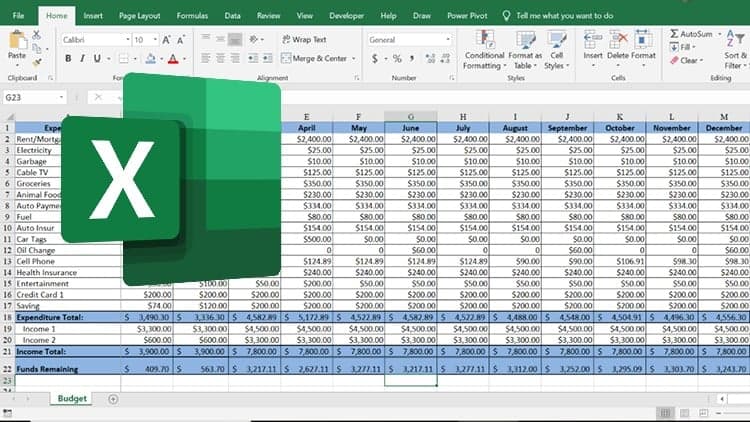
Every paycheck evaporates before you understand where it went. This course fixes that by putting you in command of a customizable Excel budget tracker. You'll build tables for bills and expenses, write formulas that calculate totals and trends, and create charts that visualize the leak. Conditional formatting flags spending that's out of line with your plan.
The insight isn't complicated: once you see where your money is going, you can choose whether that's okay. The real power comes from having a living tool that shows you month-to-month patterns and gives you data to work with, not guesses. Confidence in your finances follows naturally when you have clear numbers instead of anxiety.
Where Did It All Go?
When I was younger my mom would say, I must have a hole in my pocket, referring to me. The problem was, I would get my paycheck, from my after-school job, and in the blink of an eye the money would be gone. I had spent my entire paycheck without realizing where it all had gone. My mom was convinced I must have a hole in my pocket and the money was falling out.
Have you ever felt that way? All the hard work you've put in the previous week has finally paid off and your back account is in the positive. But, before you can ask where it all has gone, the money is spent, and your account is starting to dwindle in size.
It's been many years since I've heard my mom ask me if I have a hole in pocket. Today, the money still gets spent, but I now know where it goes.
It Starts with a Plan
In this course on using Microsoft Excel to Manage Your Personal Finances, I will guide you on how Excel can help you create and stick with a plan for managing your own personal finances.
We'll start by creating a customizable Excel Template that will help you track your daily and monthly spending habits. By tracking your spending, we can gain control over our spending habits and gain confidence in our finances. If we first have a plan for our money, we can follow that plan and come out on top within our budget.
One of the main characters from a favorite TV show I watched when I was younger, use to say, "I love it when a plan comes together!"
As we harness the power of Microsoft Excel to help track our budget, you'll begin to see the plan come together.
Putting the Plan Together
Ultimately the plan is effectively budget our spending. But, in order to get there, I will walk you step by step using Microsoft Excel to create a template for your budget. The template will include:
Effective Use of Excel Tables to Manage our Expenses. (Bills, Expenses, Subscriptions, etc.)
Simple Excel Formulas Calculating and Summarizing our Spending Habits.
Key Chart Visuals Identifying where our Money has Gone.
Apply Conditions on the Budget to Help Drive Smart Decisions on our Spending.
Stich up the holes in your pockets by enrolling in this course on using Microsoft Excel to Manage your Personal Finances and start your plan to become more financially aware with your own finances.
See you in the course.
Advertisement
Microsoft Excel for Accounting, Finance & Financial Analysis



Not the best price we've seen. The lowest we've recorded is $9.99 on 18 Aug.
This is what we recorded in US pricing — not every price this course has ever had, and prices differ by country.