Udemy
Free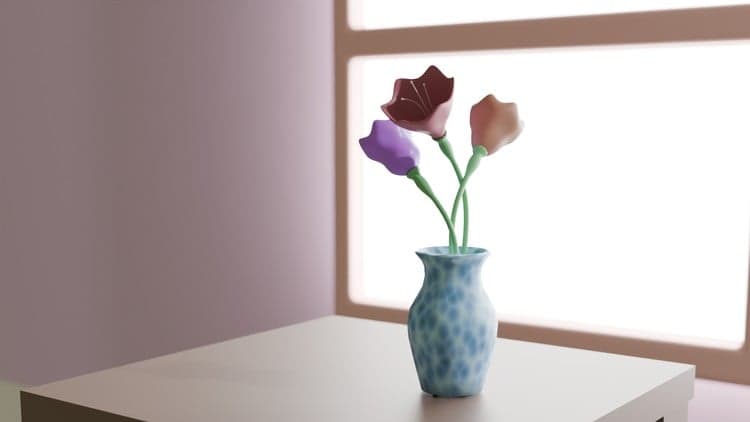 Udemy
UdemyMark your own learning status. Opening a course link does not establish enrollment.
This compact Blender mini-course is built around a single, complete project: a flower pot scene, taken from a blank scene all the way to a finished render. It's designed to be short, simple, and practical — ideal for beginners who learn best by finishing something rather than accumulating disconnected tips.
A Blender project file and a premade asset are included, so you can either follow along step by step or branch off and customize your own version. The course finishes with rendering the completed scene in Cycles.
Who it's for: Blender beginners who want a quick, self-contained project — model your own flower arrangement, texture the pot, and render a finished image by the end.
Welcome to this Blender mini-course! In just 15 minutes, you’ll learn how to create a complete flower pot scene from scratch while exploring essential 3D modeling and texturing techniques. This course is designed to be short, simple, and practical—perfect for beginners who want to learn by doing and complete a project in one sitting.
We’ll start by modeling a pot from scratch, shaping it step by step. Then, you’ll learn how to model flowers in different directions, giving your design more variety and realism. Along the way, you’ll explore how to use Blender modifiers to adjust and shape the flower forms quickly and effectively.
Next, we’ll add texture to the pot using nodes. You’ll see how to apply materials and experiment with colors to bring your flower pot to life. To make the process even easier, I’ve included a Blender project file and a premade asset you can use to enhance your scene. This means you can follow along directly with me, or experiment and customize your version.
By the end of this course, your goal is simple: create your own flower design in any direction, apply textures to the pot, build your scene, and render the final image in Cycles. Once finished, share your rendered image—it’s your chance to showcase your creativity and unique style!
Advertisement
3 Minute French - Free taster course | Lessons for beginners

Master the Art:Step-by-Step Organic Balloon Garland tutorial