Udemy
Free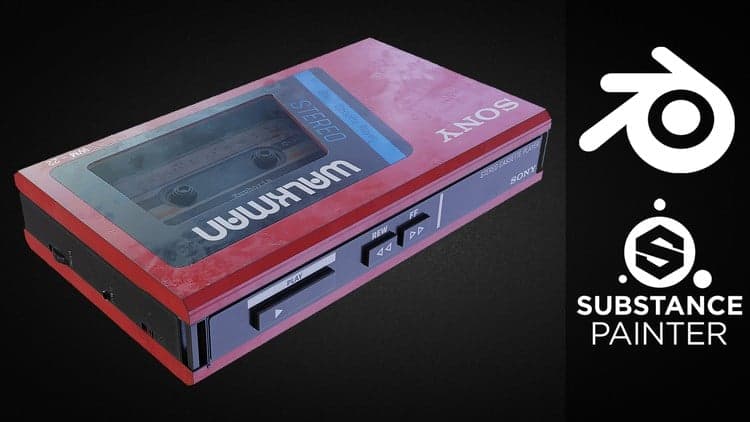 Udemy
UdemyPrice
No active coupon right now
View Course →No coupon right now. We'll tell you when there is one.
Mark your own learning status. Opening a course link does not establish enrollment.
Taught by 3D artist Aniket Rawat, this course walks through creating a Sony Walkman prop from start to finish. It covers hard-surface modeling in Blender using Boolean and Bevel modifiers, then moves into Substance Painter for baking mesh maps and texturing with Smart Masks and Smart Materials, before returning to Blender for lighting, HDRIs, and a Cycles render.
Learners with some existing familiarity with Blender and Substance Painter who want to see a full asset-creation pipeline in action, from raw geometry to a finished render.
A useful case study for anyone wanting to see the full Blender-to-Substance-and-back workflow on a real prop.
Hi everyone, My name is Aniket Rawat and I am a 3D artist who likes to create realistic and high quality 3D props and assets. In this course, I will take you through the entire process of creating a Sony WALKMAN from Start to Finish.
We will start with modelling the Walkman in Blender and we will make use of the Hard Surface techniques and learn a lot about Boolean and Bevel modifiers and general poly modelling. We will learn how to solve various glitches and shading issues that occur while working with Booleans.
Then after that we will export our model to Substance Painter and start by baking mesh maps for our model, after that we will start to texture our model. We will learn how to create realistic textures for our models by using different features in Substance like Smart Masks, Smart Materials etc.
After we finish with texturing in Substance Painter we will take our model back to Blender and render it. We will setup the material, lighting and the camera. We will also learn how to use HDRIs. I will be rendering the scene using Cycles.
This course is for everyone who wants to upgrade their skillset and have a basic understanding of Blender and Substance Painter.
Advertisement
Combat Knife 3D Game Asset in Blender and Substance Painter
This is what we recorded in US pricing — not every price this course has ever had, and prices differ by country.